Inkatech PC Tidy
A tidy Downloads folder and Desktop every week, without lifting a finger
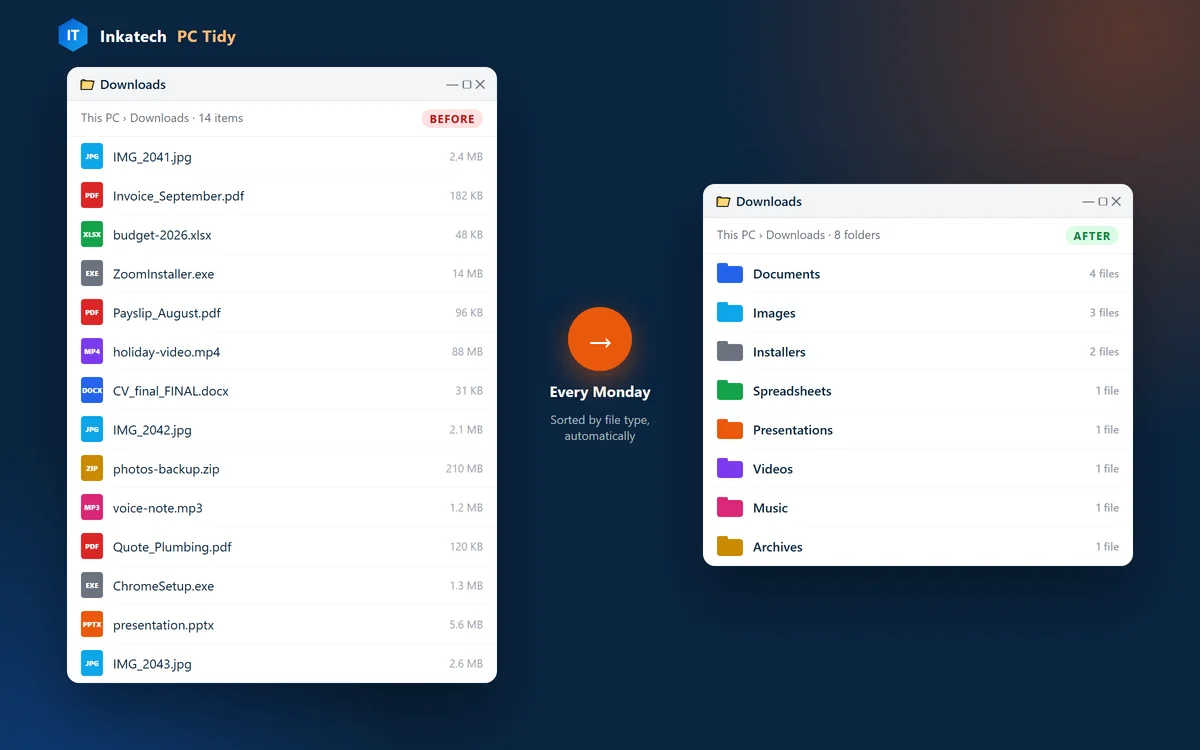
PC Tidy sorts the loose files in your Downloads folder and on your Desktop into folders by type (Documents, Images, Spreadsheets, Videos and more) every Monday, and clears out old Windows temp files. It only moves your files; it never deletes them.
Price: Free download. Installed and set up by Inkatech: R250.
How it helps
Why people use Inkatech PC Tidy
Find files in seconds
No more scrolling through 300 downloads. Invoices land in Documents, photos in Images, installers in Installers.
Set it once, forget it
It runs by itself every Monday. If the PC is off, it catches up the next time you switch on.
Safe by design
Your files are moved, never deleted. Shortcuts stay on the Desktop, and files that are still downloading or open are skipped.
What's inside
- ✓Sorts Downloads and Desktop by file type
- ✓Runs every Monday at 09:00
- ✓Catches up if the PC was off
- ✓Clears Windows temp files older than 3 days
- ✓Never deletes your files
- ✓Leaves shortcuts and folders alone
- ✓Preview mode shows what it will do first
- ✓Sort Now button, plus a log of every run
- ✓Easy uninstall, no admin rights needed
Who it's for
Anyone whose Downloads folder or Desktop has got out of hand: home users, students and small offices.
→Read our guideWhy is my PC so slow? 8 checks and what each fix costsDownload Inkatech PC Tidy
Free download. Installed and set up by Inkatech: R250.
Installing on Windows
- Open the downloaded zip, click Extract all, then open the extracted folder.
- Optional: double-click Preview.bat to see what it would sort. Nothing changes.
- Double-click Install.bat. That's it: it now runs every Monday at 09:00.
- Want it sorted right now? Use Sort Now.bat. To remove it, use Uninstall.bat.
Windows may show "Windows protected your PC" because the tool is new. Click More info, then Run anyway. The files are plain scripts you can open in Notepad and read.
Rather not do it yourself?
Have Inkatech install it: R250
We install PC Tidy for you, set the schedule that suits you and check your PC while we're there. Offices can add auto-clean, where sorted files that nobody opens go to the Recycle Bin after 7 days.
More apps by Inkatech
See all apps → GentleParentCalm, practical AI parenting support in the language you speak at home
 Super DiskiSouth African football companion: live fixtures, form and AI match insights
 Move-MeNeed to move? There's a bakkie for that, at a price you choose
Need an app for your business?
We built Inkatech PC Tidy. We can build yours: bookings, ordering, portals and AI assistants.
Get an app quote